

The AI agents of Claude Code’s creator, Boris Cherny, have been working nonstop for more than two weeks.
They’re rebuilding an entire software app from scratch, in a different programming language. To check their own work, the agents are running this loop:
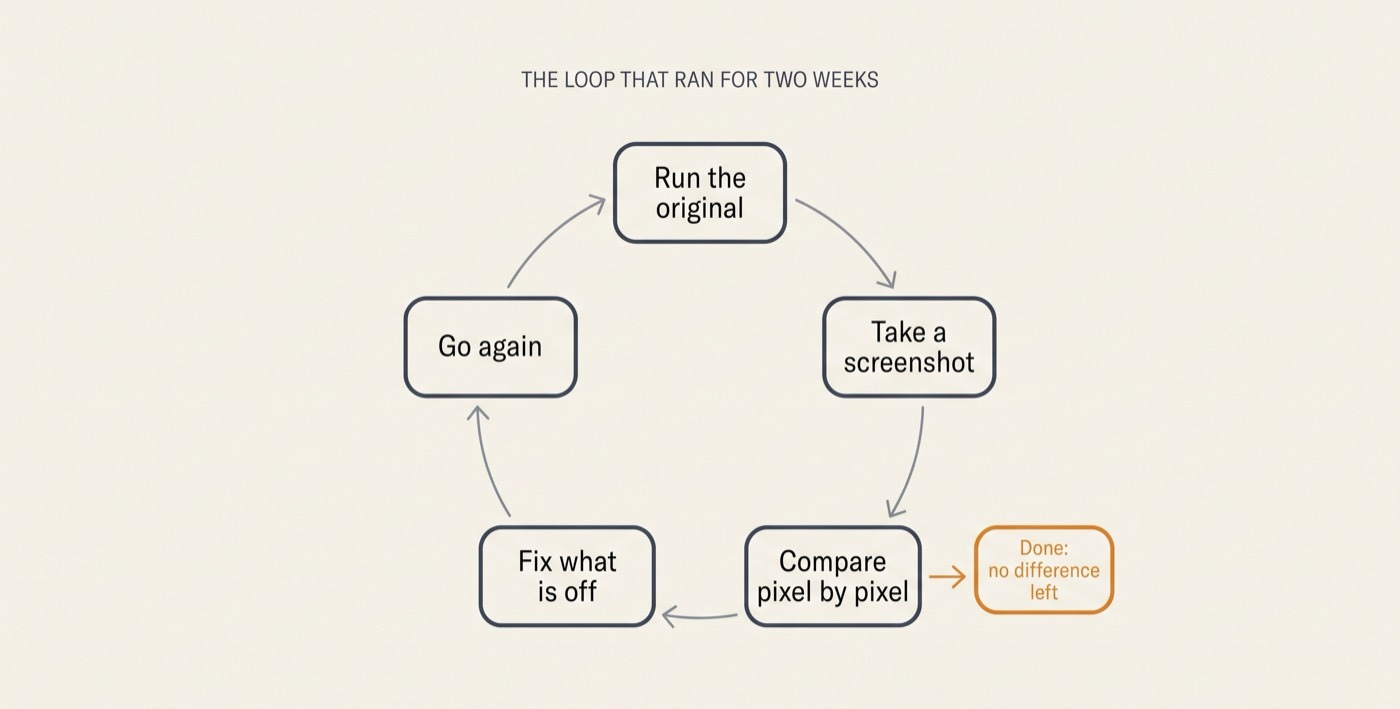
Nobody is supervising these agents. At some point, the agents even opened a chat channel in Slack and started posting screenshots of their progress every few minutes, the way an eager new hire might, so anyone curious could follow along.
You might assume that this level of autonomy required a team of engineers. An elaborate setup. Some secret configuration. But the entire instruction that set all those agents in motion was just one paragraph:
“I want you to rewrite the Electron app in Swift. I want you to run the Electron app in the Mac virtual machine, screenshot it, and then look pixel by pixel, compare it to the Swift version. Don’t stop until you’re done.”
In plain terms:
Goal: Rebuild an app from scratch in a different language.
Check: Keep checking your own work against the original.
Permission: Until it’s flawless.
That’s the whole thing.
Cherny explains the whole story in this short clip that is a must-watch:
This one sentence from him captures why it’s so exciting:
“Everyone here could do it.”
He’s right. You could write that too. But you probably haven’t.
Instead, most AI users are:
Babysitting their AI step-by-step.
Creating elaborate multi-phase prompts.
Simply using AI to answer questions.
There’s nothing wrong with any of that. But it’s a fraction of what AI can already do for you, and most never find out.
No One Knows The Actual Limits Of AI
When you ask AI for something small, it hands back something small and everything feels fine.
The email gets written.
The transcript gets tidied.
The slides get formatted.
You got what you asked for. There’s no pop-up box warning you that you just used a supercomputer like a calculator.
With other software, all of the features are hand-coded into the app. You access them via menus and buttons that have been designed for you. There are manuals that cover everything.
But AI is different.
With AI there is no cheat sheet, because AI’s abilities weren’t installed. Rather, they emerged from training. This means nobody knows what AI is truly capable of, including the people who built it. It also means that you can uncover AI capabilities that no one else in the world has.
That silent gap between what AI can do and what users ask of it is the whole problem.
Cherny has a name for this gap: overhang.
Source: Interview At Y Combinator
“The model is able to do all sorts of things with today’s models, not a future model, but today’s model, that we have not yet realized. There’s this overhang because the model can do this at every given model generation, but there is often not a product that lets the model do this.”
—Boris Cherny
The capability is already sitting there, unused. What’s missing is a person who thinks to hand over the bigger job that exposes AI’s latent abilities, and a setup that lets the model see it through.
Bottom line:
Cherny’s two-week app rebuild from one paragraph was not a fluke. It’s an emerging prompting pattern among the most advanced AI users that taps into AI’s latent abilities. And what’s amazing about the pattern is that it’s both very easy to learn and easy to use. I call it ultraprompting.
An ultraprompt is a single prompt with three parts: a goal, a way to check the work, and permission to keep going.
The goal names the finish line. The check is a scoreboard the AI can read without asking you. The permission — “don’t stop until you’re done” — is what turns a single answer into two weeks of work.
Remove any one of the three and the pattern collapses. No goal, and the AI has nowhere to go. No check, and it can’t tell better from worse. No permission, and it hands you a draft and waits.
An ordinary prompt asks for an answer. An ultraprompt hands over a job.
This article will teach you to write one.
The World’s Top AI Creators Are Getting Astounding Results With Single Prompts
Here are a few ultraprompt examples that have blown my mind:
An Anthropic engineer rewrote core software with one prompt.
A prompt that loops autonomously maintains important code.
A simple prompt beat an “impossible” benchmark.
One prompt recreated a famous game.
Google built an operating system with one prompt.
A one-page prompt conducted 700 autonomous experiments in two days and got astounding results.
#1. An Anthropic Engineer Rewrote Core Software With One Prompt
Bun is a foundational piece of software that other programs are built on top of, including Claude Code itself. Bun’s entire codebase, over 500,000 lines, needed to be translated from one programming language to another. That’s the kind of rewrite that, in Cherny’s words, would have taken human engineers “definitely over a year.” Instead, it was handed to Claude Code as one job. “It was one prompt,” Cherny says. It finished in 11 days, with a single engineer checking in on the AI’s progress rather than a team doing the work.
#2. A Prompt That Loops Autonomously Maintains Important Code
Claude Code has started to maintain its own code. Every day, standing agents go out to hunt for bugs and fix them, work that Cherny describes as “doing the work of dozens or hundreds of engineers.” Nobody is typing requests for fixes each morning. The agents were set up once, and they run repeatedly.
In Cherny’s own words:
“We have a Slack channel where we just had Claude start a bunch of different routines to maintain its own code base. For example, one routine is clean up dead code. This is a single prompt. It’s like one sentence. Claude runs this every day. It’ll look for dead code across all the code bases using static and dynamic analysis. We didn’t prompt that. It just kinda figured it out, and it’ll put up a request every day to delete the dead code.”
#3. A Simple Prompt Beat An “Impossible” Benchmark
AI researcher Jeremy Berman recently posted the best score anyone has recorded on ARC-AGI-3, an AI IQ test made of 25 puzzle games the AI has never seen and must figure out with zero instructions.


The same model playing by itself wins about 30% of the time. Berman’s version won 96% of the time.
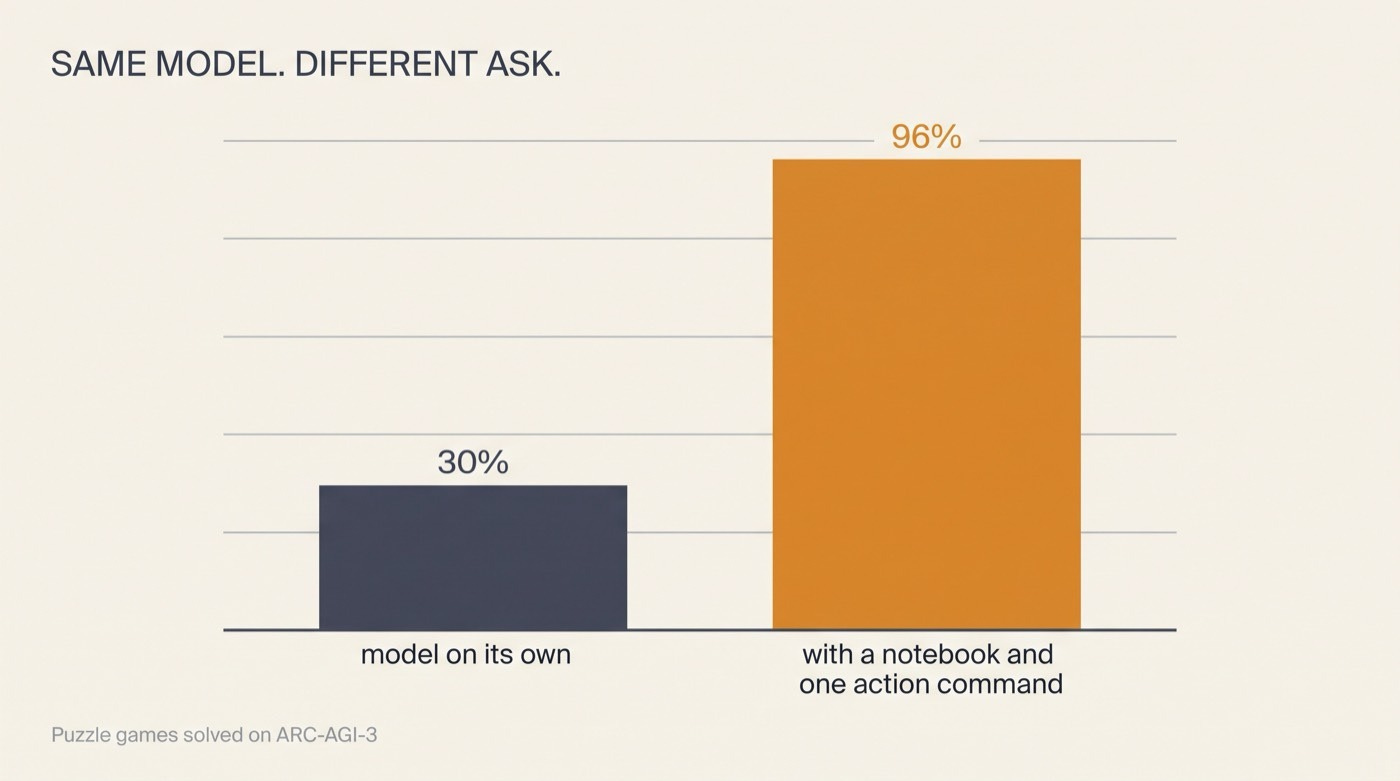
You’d assume he built an elaborate puzzle-solving machine to get there. But he didn’t.
Here is his own description of the entire system:
“…basically Claude Code + Opus 5 (high), one action command, and filesystem logs. Almost nothing ARC specific.”
Translation: The “one action command” is a tiny program that works like a game controller wired to a tape recorder: its only job is to press a button in the game, then write down what the screen looked like afterward. And the “filesystem logs” are that written record, an ordinary text file that became the AI’s memory.
Rather than trying to hold 25 games’ worth of detail in its head, the AI did what a careful scientist does: it wrote every move and result in its notebook, went back and reread its own notes, and kept a running list of what it had figured out, with each finding labeled by how sure it was, from “confirmed so far” down to “untested.”
#4. One Prompt Recreated A Famous Game
This one you can see with your own eyes. An AI founder named Matt Shumer typed a single prompt into Claude Code with “ultracode” turned on and walked away. (“Ultracode” is Claude Code’s highest effort setting, which allows it to take on bigger, self-directed jobs.)
Here’s what Shumer typed in word-for-word:
“I want you to build a first-person shooter at the level of the most recent Call of Duty games. It should be utterly perfect, visually beautiful, with every single thing done at AAA quality—from textures to physics to anything you could think of.
Fan out sub-agents and have sub-agents tackle each one individually so that the game is utterly perfect. You should /loop on each item and have a separate sub-agent check it visually to ensure it looks triple A. That separate sub-agent should be a really harsh critic, and if it doesn’t look triple A, it should keep going.
Don’t stop until each sub-agent is utterly wowed with the quality when compared with the actual Call of Duty game. It should literally compare them side by side blind and say which one looks better. Do this in ThreeJS. /loop until it’s utterly perfect. Fan out sub-agents and ultracode.”
What came back, hours later, was a playable 3D shooter in the style of Call of Duty: roughly 55,000 lines of code, with every texture, animation, and sound effect generated by the AI itself. Nobody touched it mid-run. The demo racked up millions of views:
Then people started creating their own versions of the prompt. One builder pointed it at the racing game Burnout Paradise and got back a drivable, drift-and-crash game he put online for anyone to play.
Here’s the part that matters for you: Shumer’s prompt contained no game-making expertise. What it contained was a management structure. He calls it the Gauntlet Loop:
Give a lead AI the goal, plus a concrete example of what great looks like. For the game, that example was actual screenshots of Call of Duty.
The lead AI breaks the job into small pieces, and every piece gets two AIs: a builder, and a separate critic whose only job is to hold the work up against those screenshots and name the biggest gap it can find. (The builder and the critic are never the same AI, for the same reason a writer shouldn’t edit their own draft: the one who made the thing always believes in it a little too much.)
If the real screenshot still wins, the builder goes back to work. The loop doesn’t stop until the builder’s version wins.
#5. Google Built An Operating System With One Prompt
In May 2026, Google’s team published an experiment. They gave their own coding agent, called Antigravity, a single prompt asking it to build a working operating system. (An operating system is the foundational software that runs a computer, like Windows or macOS.) It’s the kind of project computer science legends spend years on.
The main agent spun up 93 sub-agents, made 15,314 separate requests to the AI model, and delivered a very basic system that boots and runs the classic video game Doom. Nobody guided it or corrected it along the way. The total cost at standard prices was just $916.92.
#6. A One-Page Prompt Conducted 700 Autonomous Experiments in Two Days And Got Astounding Results
The last example comes from Andrej Karpathy, and it hints at where all of this is heading. Karpathy is one of the most famous AI scientists in the world. He helped found OpenAI, the company behind ChatGPT, and he ran the AI team at Tesla.
In March 2026, he released a project called autoresearch that hands AI the one job everybody assumed would stay human the longest: making discoveries about how to improve AI.
Training an AI model normally takes enormous computers running for months, but Karpathy built a tiny practice version, one that can be trained from start to finish in five minutes.
Then he wrote a one-page instruction sheet and let an AI agent loose on it. All night long, the agent plays scientist.
It comes up with an idea that might make the training work better.
It runs a five-minute test.
It looks at the score.
If the idea helped, the agent keeps it.
If it didn’t, the agent throws it away and tries something else.
No one is watching. No one needs to be, because the score settles every argument. In one two-day run, the system worked through roughly 700 experiments and ended up with 20 improvements that survived testing — enough to cut training time by 11%. Each one is a small, genuine discovery about how to train AI better, and no human thought of any of them. One of them wasn't even an improvement so much as a correction: the agent noticed that Karpathy had never applied regularization to part of his own model. One of the best AI researchers alive had simply never caught it.
One of the discoveries wasn’t even an improvement so much as a correction: the agent found a genuine bug in Karpathy’s own code, a mistake that one of the best AI researchers alive hadn’t noticed.
What’s Going On Here?
In the last few months, we have crossed a critical ability threshold that is allowing agents to create incredible results from single prompts that run for hours or days.
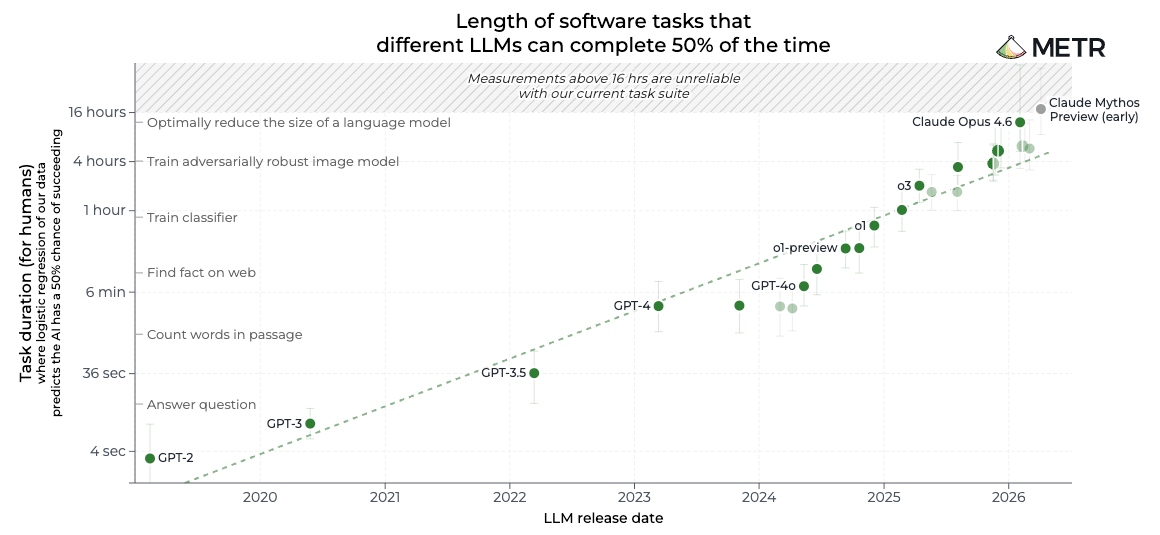
Following the trends, we can expect this phenomenon only to grow. An AI research organization named METR gauges AI’s progress with a human yardstick: how long a task would take a skilled person to do. By that measure, the tasks AI can finish at 50% reliability doubled in length roughly every seven months from 2019 to early 2025, from tasks that would take a person a few seconds to tasks that would take a person about an hour.
Since then the pace has accelerated. From 2024 onward, the doubling time has fallen to under three months, and by mid-2026, the best models were finishing tasks that would take a person around twelve hours (and METR says its test is almost out of tasks hard enough to challenge the newest models). Fast forward a few years and AI will be productive for months at a time.
Here’s another way of looking at the implications:
On one hand, AI is getting smarter and longer-working (growth).
On the other hand, what most people ask of AI has barely moved since 2023 (stagnation).
Overhang is the space that grows between them as one compounds while the other sits still.
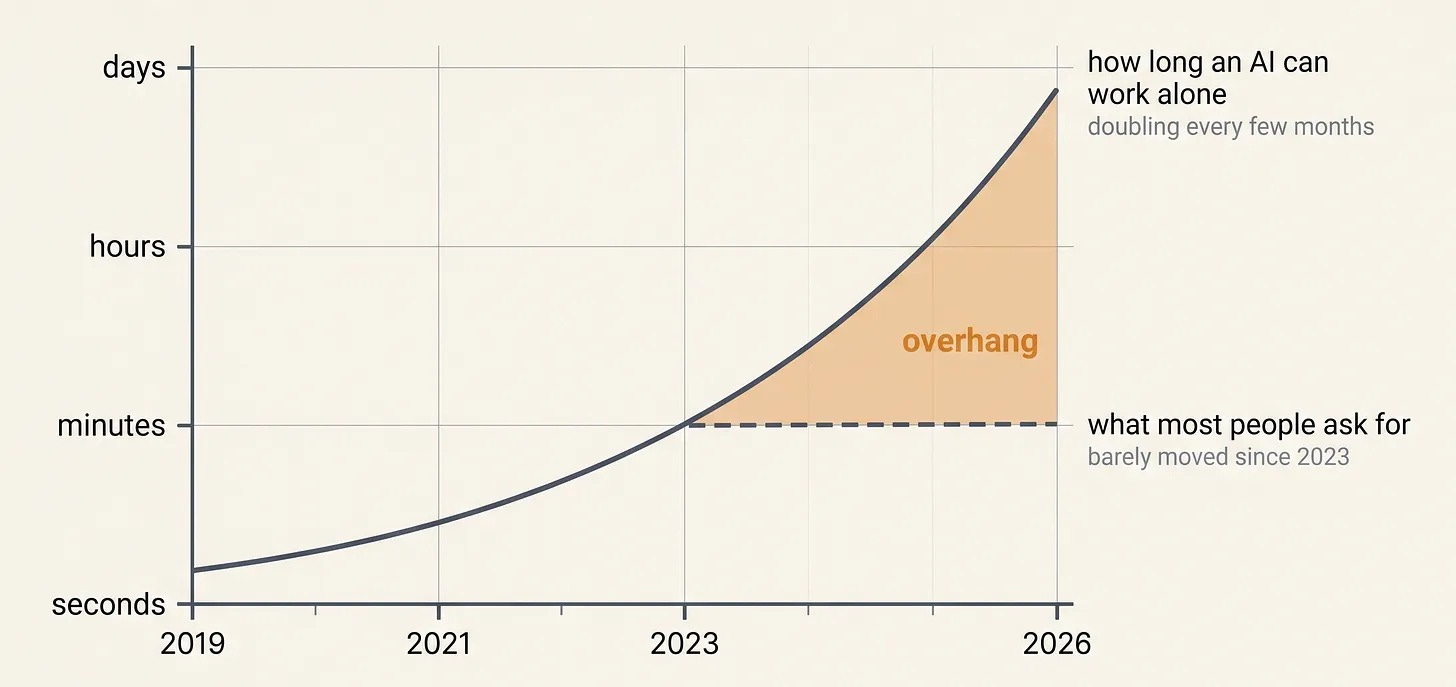
Therefore, the cost of asking small roughly doubles every seven months. In 2023, asking small left maybe a paragraph on the table. Today it leaves two weeks of unsupervised work you never knew you could have had.
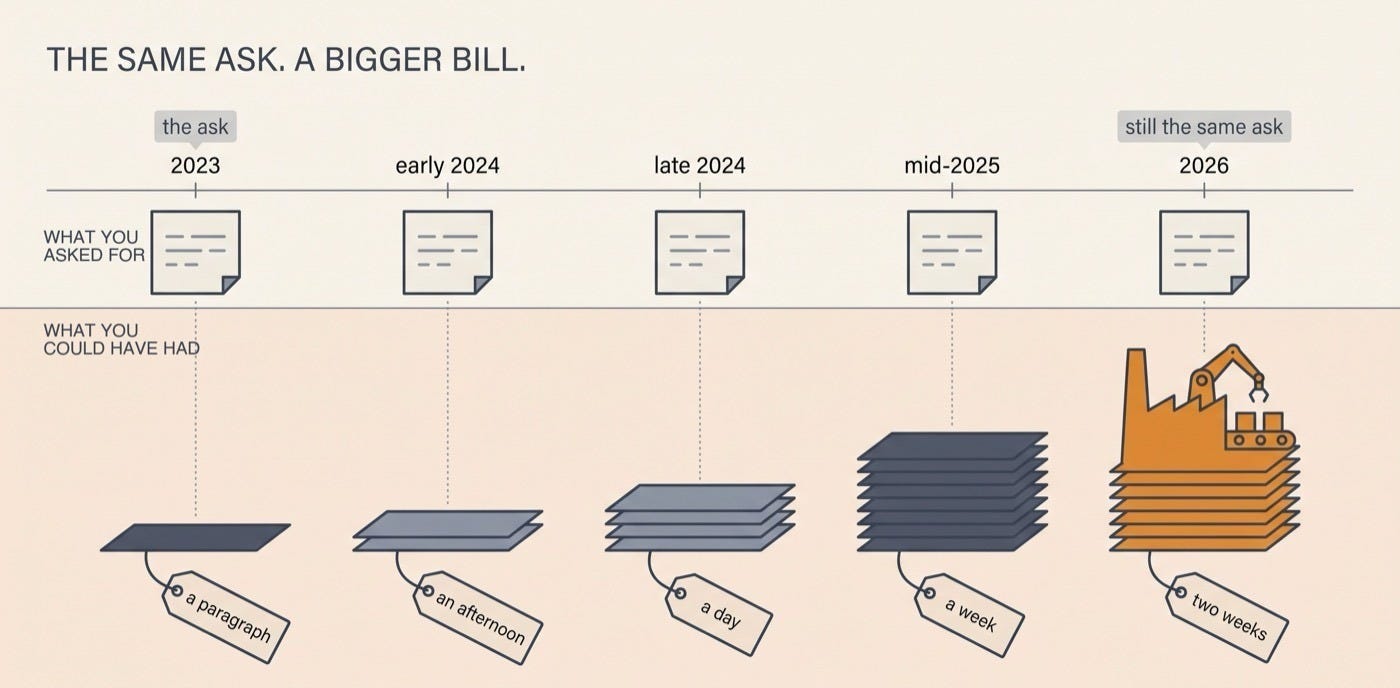
Maybe you don’t write code, but the same gap exists inside your work too. The rest of this piece is about how this applies to you and how you can close your own gap…
The 3 “Magic Words” That Tap Into AI’s Latent Potential
There are three names for the machinery an Ultraprompt sets in motion, and they can all be triggered inside Claude Code when you use the “ultracode” effort level setting:
Dynamic workflow
Goal
Loop
Amazingly, each of these features was launched in the last few months, which means that their potential is still largely unexplored.
#1. Dynamic Workflows
What Cherny calls a dynamic workflow is Claude Code taking one job that’s too big for a single agent, breaking it into stages, and spinning up as many copies of itself (sub-agents) as the work needs. A single dynamic workflow can generate dozens, hundreds, or even thousands of sub-agents.
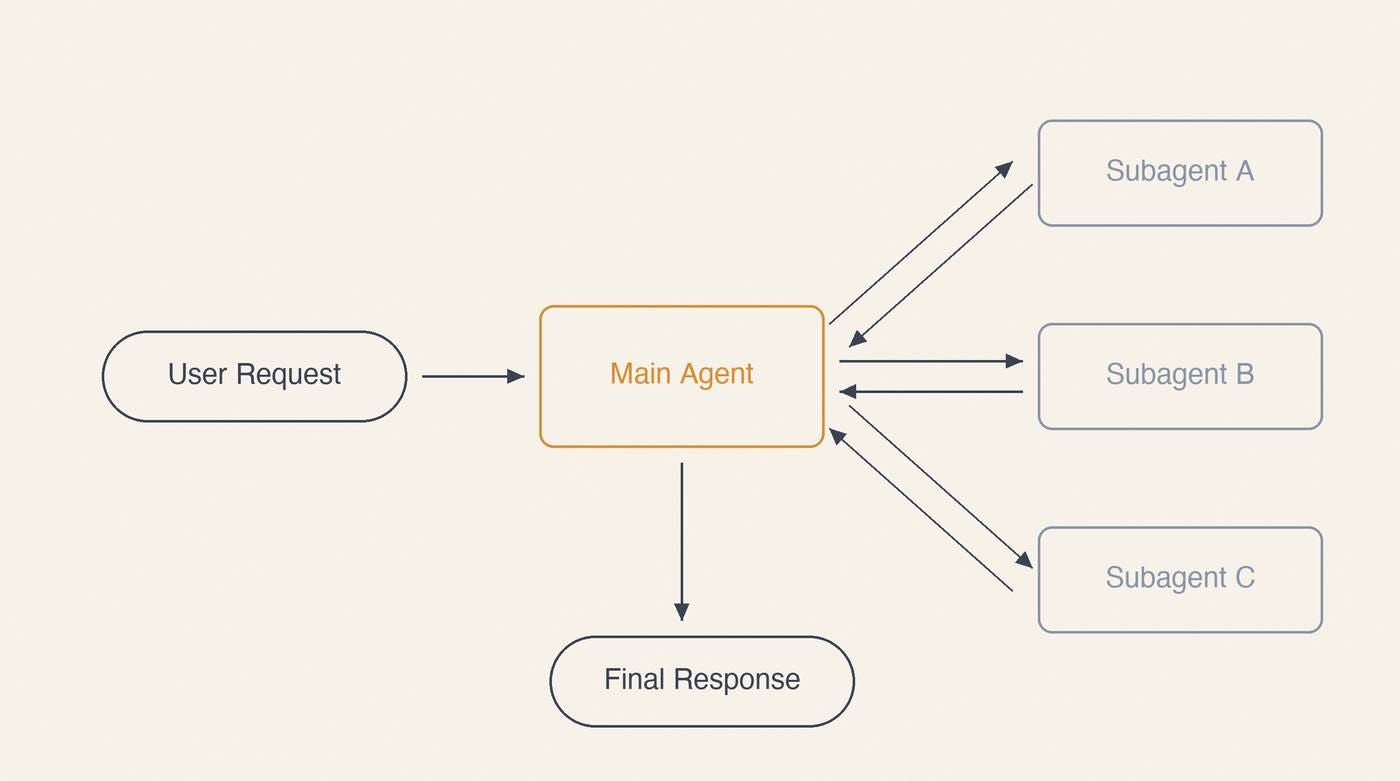
Let me be more concrete. Picture a project manager who hires several temporary teams on the spot:
Team #1 (divergent thinking): Brainstorms different ways the project could be done.
Team #2 (convergent thinking): Shortlists the top ideas.
Team #3 (red teaming): Stress-tests the shortlist to pick one path.
Team #4 (implementation): Splits the work and builds.
Team #5 (verification): Confirms the work was done to specification.
The 11-day Bun rewrite ran exactly this way. Starting a dynamic workflow is absurdly easy. As Cherny puts it:
“All you have to say is, ‘Use a workflow.’ That’s it.”
When to reach for it: any time the real job is too big for one pass and splits naturally into stages. Say you have a folder of 60 customer-call transcripts, and you need every one read, the complaints pulled out, grouped into themes, and written up. That isn’t one task. It’s a first pass across all 60, a second pass to cluster what they share, and a third pass to write the summary. A dynamic workflow runs all three passes, using as many sub-agents as needed to make sure each part of the job is done at high quality.
How to start one: you don’t set anything up. Describe the whole job in plain English and add three words at the end: Use a workflow.
For example:
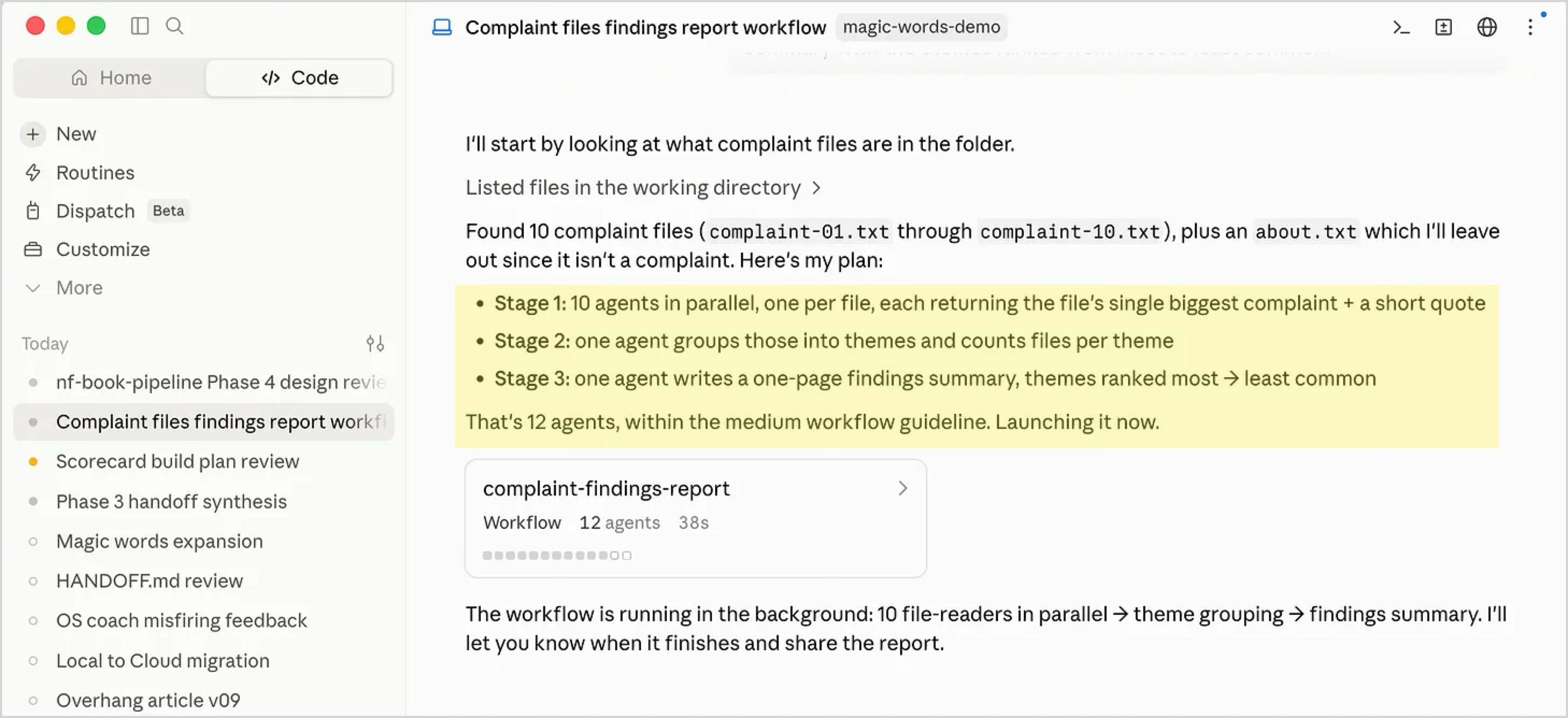
Use a workflow to turn the customer call files in this folder into a findings report. Stage 1: fan out one agent per .txt file, reading them in parallel, and have each agent pull the single biggest complaint plus a short quote from its file. Stage 2: a second agent groups those complaints into themes and counts how many files fall under each theme. Stage 3: a final agent writes a one-page findings summary with the themes ranked from most to least common.
You’ll see Claude start the fan-out:
#2. Goals
What Cherny was doing when he set that two-week rebuild loose was stipulating a destination and a stopping condition. A goal is exactly that: you name the finish line and let Claude keep working until it’s genuinely reached.
It’s like telling a contractor, “repaint this room, and I’ll know it’s done when there are no streaks in daylight,” then letting them work without you standing over the brush.
How to start one: In Claude Code you can state a goal in plain words, the way Cherny did:
Destination: “I want you to rewrite the Electron app in Swift.”
Stopping Condition: “Don’t stop until you’re done.”
Alternatively, you can type /goal in Claude Code followed by the finish line to make Claude check its own work against it every round.
When to reach for it: any time you’d want to say “keep going until it’s actually good, and check your own work.”
For example, let’s say you want your muddled About paragraph rewritten until a stranger gets what you do in one read. You type the finish line as a goal, and Claude drafts, checks itself against that finish line, and drafts again, instead of handing you one version and waiting.
Your ultraprompt might be:
/goal the paragraph in about.txt is clear enough that a stranger could say what I do in one sentence, or stop after 5 rounds
#3. Loops / Routines
A loop is the pattern behind Claude’s daily code-maintenance agents (as described by Cherny): it’s Claude Code taking the same action over and over until a desired result is achieved. You set it up once, and it keeps going.
Loops are the opposite of a workflow. Instead of one giant job split into stages, a loop is one small job that repeats until finished.
Cherny’s description of the maintenance jobs is the whole idea in two lines:
“This is a single prompt. Claude runs this every day.”
When to reach for it: any time you want Claude to keep an eye on something while you work. Start a slow build and have it check every few minutes, then tell you the moment it finishes. Or point it at a folder and have it summarize each new file as it lands, while you keep writing.
How to start one: type /loop, how often you want it, then the task.
For example:
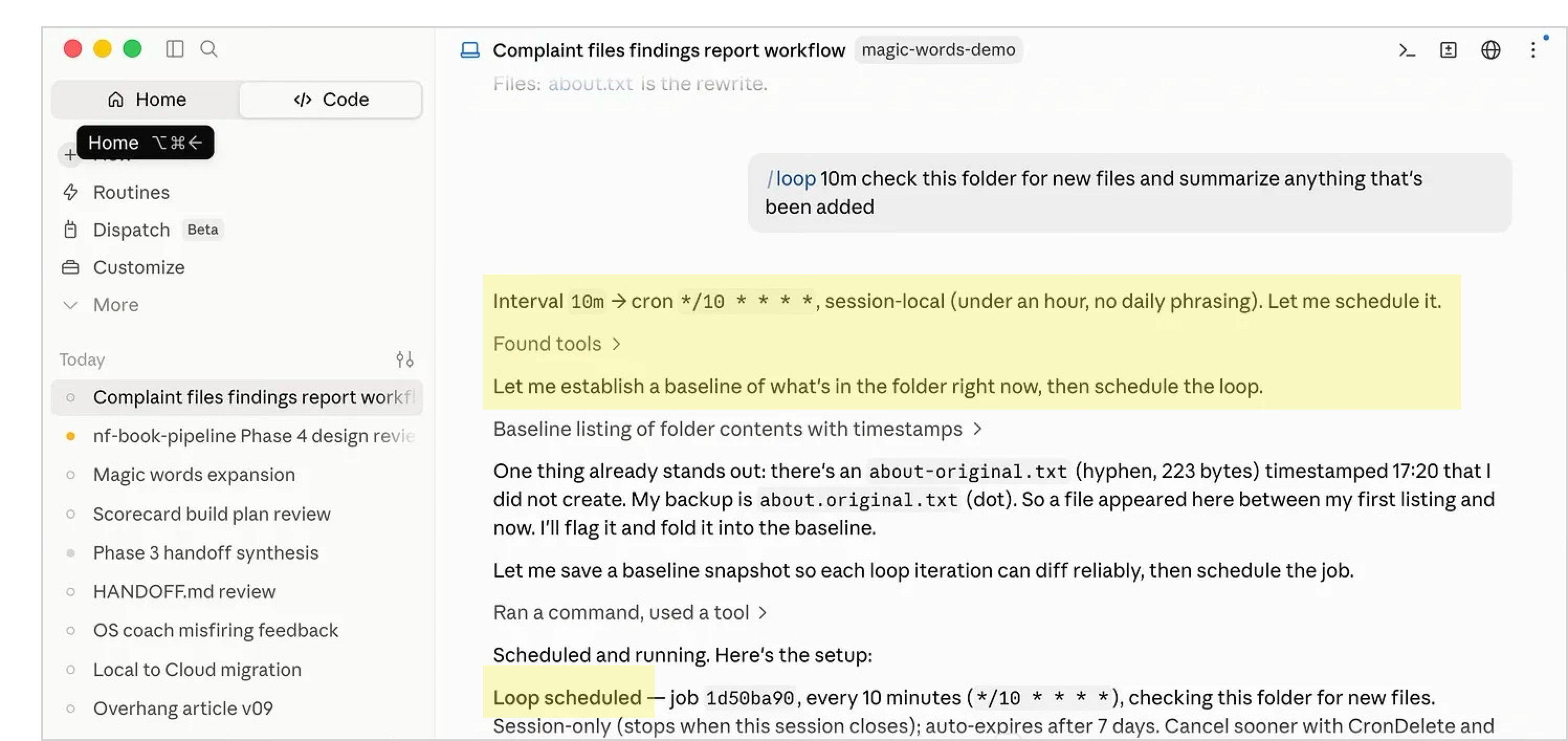
/loop 10m check this folder for new files and summarize anything that's been added
You’ll see:
What’s the difference between a loop and a routine?
A loop runs inside an open Claude Code session on your computer at a set interval, and if you close the session or turn off your computer, the loop stops.
A routine is a prompt that runs at a scheduled time or in response to a specific event. Routines run in Anthropic’s servers, rather than on your computer, allowing Claude Code to perform tasks even while your computer is off.
What This Looks Like When You Aren’t Technical
All of the examples above came from engineers.
Leandra is not one. She is a student in The Agentic Academy, which I co-teach with Wyndo and Bonnie Johnston.
But last weekend, she built her own Mac writing app from scratch after we taught her about dynamic workflows in class. She wanted something like OmmWriter, the distraction-free writing tool, but personalized for her unique needs.
During class, I asked folks for their learning victories. Here is what Leandra shared:
“It’s a simple app [that] was entirely a product of curiosity. Instead of downloading an app not optimized for my needs, I simply went to Claude Code.”
She describes the app that Claude built for her:
“It’s optimized for not having any distractions, so it’s a full window. Pretty backgrounds, these peaceful sounds, and then there’s this clicking, this typewriter sound when you type.”
Leandra didn’t design any of that in code. She described it. Here was her whole prompt:
I essentially want to build a replica of the OmmWriter app, but save it in Markdown instead of RTF. I would prefer it to be an app that lives on my computer and opens saves locally.
“That’s all I wrote,” she said. “And then Claude Code asked me some questions about what I wanted, and we went back and forth.”
Claude offered to build her app in Swift, so it would use less memory and run faster. Leandra agreed, and came back later to a finished program that had even named itself. “It named it Hush, and a few minutes later, it installed it. I’m so happy.”
Notice what she didn’t do. She didn’t lay out the steps, or the file structure, or research how you package a Mac app. She just handed over the whole outcome and answered a few questions along the way.
“It was not a crazy prompt,” she said. “We think we need to know so many skills. We really just need to know the command language. Even if you don’t know how to do it, you can accomplish it now.”
Think about doing the same thing that Leandra did, for all of the simple apps you spend hundreds of dollars on per month.
The “Magic Words” Combine Into A System
At first glance, these stories appear to prove that a few magical words can unlock enormous amounts of work.
That is the wrong lesson.
The initial ultraprompts did not contain all the intelligence required to translate Bun into a new programming language, maintain Claude Code, solve unfamiliar games, recreate Call of Duty, build an operating system, recreate a writing app for focus, or conduct 700 experiments.
Instead, the “magic words” created the conditions for the AI to organize its own intelligence.
Each of those examples reveals a different part of this emerging management system:
Boris Cherny’s software rewrites show the power of delegating an entire outcome rather than feeding AI one small task at a time. Claude worked out the steps on its own and kept going for days.
Anthropic’s recurring loop agents that maintain its software show that a prompt can create an ongoing responsibility, not merely request a one-time answer. The AI finds the work, performs it, checks it, and returns again the next day.
Jeremy Berman’s ARC-winning system shows the importance of memory, experimentation, and tool creation. Claude recorded what happened, formed hypotheses, tested them, and built whatever parsers, simulations, and search programs the problem demanded.
Matt Shumer’s Gauntlet Loop shows the value of an AI organization. A lead agent divides the work among builders while separate critics compare each result with a concrete example of excellence and send weak work back for revision.
Google’s operating-system experiment shows that one agent can coordinate an enormous tree of sub-agents, distribute thousands of pieces of work, and assemble them into one functioning result.
Andrej Karpathy’s autoresearch project shows what happens when experimentation becomes fast and the score settles every argument. The AI can generate a hypothesis, run an experiment, measure the result, preserve genuine improvements, and repeat hundreds of times without waiting for a human.
Leandra’s writing app shows that none of this belongs to engineers. She described the outcome she wanted in plain English and answered a few clarifying questions, while Claude made the technical calls she couldn’t: choosing the programming language, designing the app, naming it, and installing it.
These systems do not all use the same method. Some problems need many competing ideas. Others need parallel workers. Some need a builder and a critic. Others need a standing agent that returns every day. When the route is obvious, the AI may simply need to execute it.
The shared pattern is deeper:
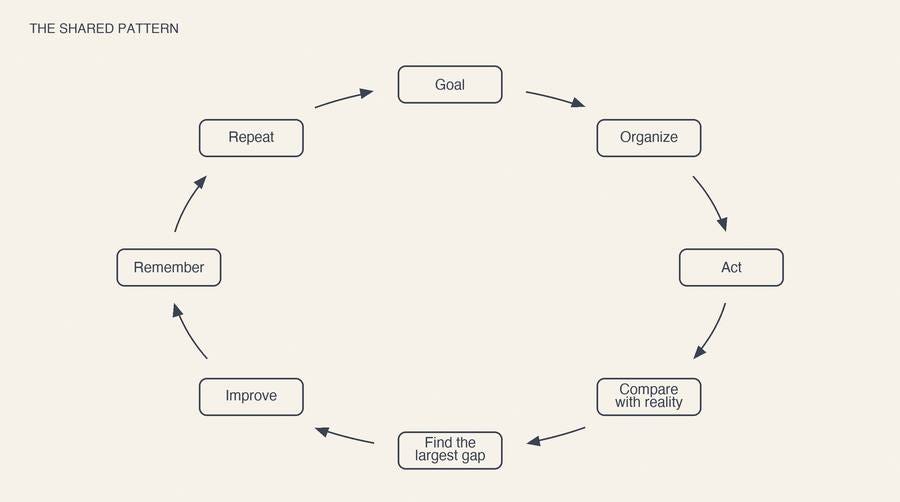
In the old prompt-engineering model, the human tried to specify the steps:
“Here is exactly how I want you to think and what I want you to do. First do [x]. Then [y]. Then [z].”
In the emerging model, the human designs a small, self-correcting organization:
“Here is the outcome, the evidence that will prove you succeeded, the environment you can operate in, the boundaries you must respect, and the budget you can spend. Decide how to organize the work, test the results, and improve them.”
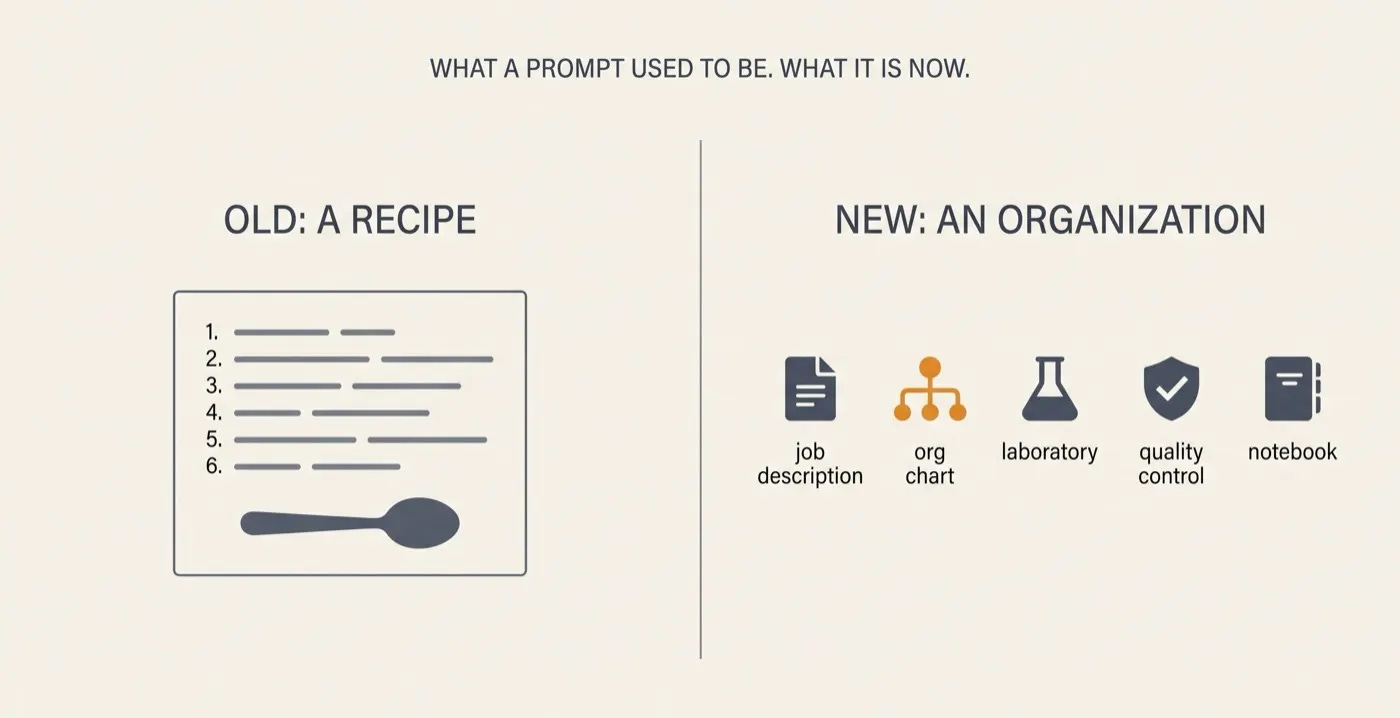
The prompt becomes less like a recipe and more like a combination of five things:
a job description (the outcome you hand over).
an org chart (the team of agents it organizes).
a laboratory (where it tests ideas).
a quality-control check (that verifies the work).
a notebook (the memory it keeps).
The most important ingredient is not autonomy by itself. An AI can autonomously produce bad work forever. The leverage comes from autonomy connected to trustworthy feedback.
Karpathy’s AI had a numerical training score. Berman’s agent could see whether its moves won the game. Shumer’s critics had Call of Duty screenshots. Claude’s coding agents had tests, static analysis, and working software.
The clearer the signal separating better from worse, the more safely the human can step out of the loop.
There is also another important limit. “Keep going until it is perfect” may work as a dramatic demo, but it is not a responsible general rule. An autonomous loop also needs a budget, boundaries, escalation conditions, and a finish line: a clear definition of when success is achieved or further work might no longer worth its cost.
Bottom line:
An Ultraprompt is the seed of a temporary organization that can build, test, criticize, remember, and improve its own work.
The implications of this way of talking to AI are profound and require a new mindset. Put differently, as AI evolves, we need to evolve how we interact with it.
PAID SUBSCRIBERS:
Read the full article, get a tutorial, and download the ultraprompting skill
You’ve now seen what one paragraph of plain English can set in motion. You know the magic words, and you know the truth underneath them: the words aren't the secret. The conditions they create are.
In the rest of this article, you learn to create those conditions yourself, starting with your own work. You’ll learn:
The two mindset shifts that separate people getting these results from everyone else. The prompting instincts you learned on older models are now the thing holding you back. See what replaces them.
The complete 7-step protocol for handcrafting an ultraprompt, with ready-to-use language you can copy for every step. Hand over whole jobs, set destinations instead of routes, and let the AI find its way there.
The future we’re heading toward: the second-order implications most people won’t see coming until it’s too late.
In the next two weeks, you’ll also get:
Claude Code tutorial so you can install the desktop app, if you haven’t already. Unfortunately, Claude Code is very challenging to install for non-technical people without guidance. Once you install it, you’ll be able to ultraprompt and use the magic words. Our team has helped dozens of people install the software, so we know where people get stuck.
Ultraprompting skill that runs this method for you. We’ve spent a few weeks creating an AI skill that identifies ultraprompting opportunities for you and then creates one for you.
Personal case study. I’ll share my most successful ultraprompting experiments as step-by-step case studies as well.